Google and Facebook Sign-Ins: Verification Prompts Explained
Whiteout Survival is topped up through the sign-in the player actually uses — Facebook or Google — which means an order opens a session that the account provider may want confirmed from a new device. The client's page handles that in one line: keep two-step verification reachable and send the code only through the order chat. Answering a prompt takes under a minute; chasing one after the fact takes considerably longer, which is why the small piece of preparation is worth doing before payment.

Key takeaways
- The order needs the sign-in you actually use — Facebook or Google — plus the account and password.
- Keep two-step verification reachable, and route any code through the order chat only.
- Change the password after delivery; the store signs out and clears its login history once the order is done.
- Published delivery for this title is usually 10–30 minutes once the details are in, with live support around the clock.
Why the sign-in method you send has to be the real one
Whiteout Survival is unusual among the titles on the store because the login it needs is a social login. Facebook and Google are both accepted, and the page is explicit that the one to send is whichever you genuinely log in with. Sending the wrong provider is not a small error: the session opened for the purchase would not be the session your account recognises, and the order would stall at the first step rather than at the last.
This is the reverse of the situation some other titles create. On the Arknights: Endfield page, for instance, only the official account login is used and a social sign-in will not serve — a Google or Facebook login is specifically ruled out there. Whiteout Survival sits on the other side of the line, and the practical consequence is that the buyer has to know, not guess, which provider holds the account.
There is also a reason the page asks for the password rather than a session transfer or a friend request. The account-login route exists so that the pack can be bought inside the game's own shop, which means signing in the way the player does. No other method of entry reaches the in-game offers, and Frost Stars alone would not either, since they pass through at face value.
Where each piece of information goes
The table below is the whole preparation, written as a place-each-item-here list. Everything in the left column is required by the order; the middle column is where it belongs; the right column is the published advice that goes with it. Nothing on the list is optional, and nothing on it needs to be written down anywhere outside the order itself.
| Item | Where it goes | Published advice |
|---|---|---|
| Sign-in method | Named on the order | Facebook or Google — whichever you actually log in with |
| Account and password | Order chat | Used only to sign in and buy the pack in the shop |
| Verification code | Order chat only | Keep two-step verification reachable while the order runs |
| New password | Set by you afterwards | Change the password once delivery is complete |
Worked example: two calculations before you pay
Verification is a minute of work, and it is worth knowing what that minute protects. Two published figures make the point, and the arithmetic below is the author's, taken from prices and terms printed on the client's pages.
First, the new-user coupon. The site publishes a 15% coupon for registered users with no threshold and a 30-day validity. On the ANY 9.99 pack listed at $8.15, a 15% reduction is 0.15 × $8.15 = about $1.22, which leaves roughly $6.93 to pay. The assumption is that the coupon applies to the order value as published; the term no threshold means nothing has to be added to the basket to use it.
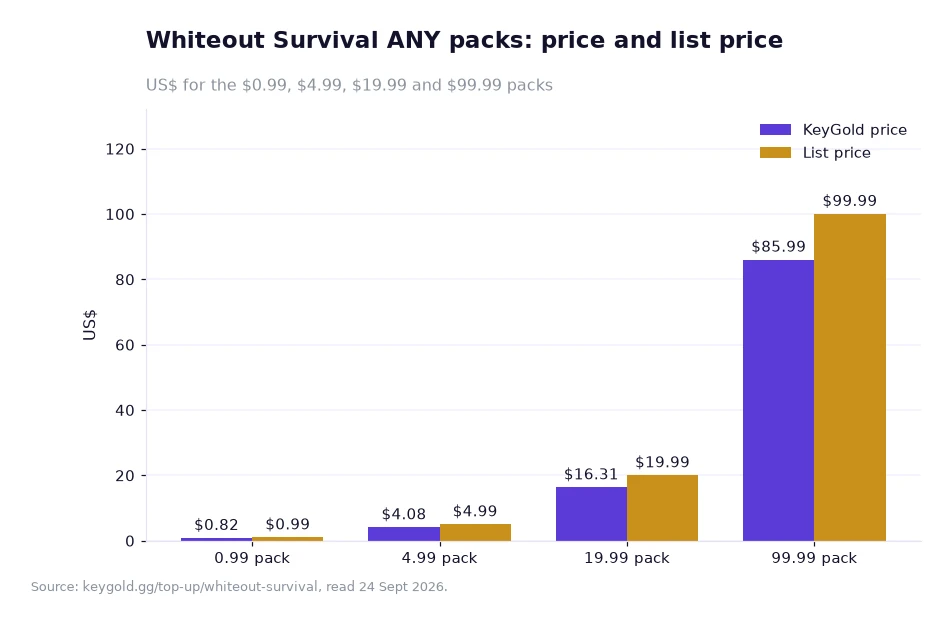
Second, the size of the ordinary markdowns on the site, read straight off a price table. Take the Whiteout Survival bands drawn in the chart further down: $0.82 against a list price of $0.99, $4.08 against $4.99, $16.31 against $19.99 and $85.99 against $99.99. The gaps are $0.17, $0.91, $3.68 and $14.00 respectively, and each one is the difference between the two published columns rather than a projected saving.
Put the two together and the reason for the checklist appears. A block of the account sign-in costs minutes rather than money, while the gap between the columns on a single larger pack is measured in dollars. The preparation is the cheaper purchase of the two.
Reading the price columns while you wait
The chart above plots this game's own ANY bands, four of them, with each band drawn twice: 0.99 at $0.82 against a $0.99 list price, 4.99 at $4.08 against $4.99, 19.99 at $16.31 against $19.99, and 99.99 at $85.99 against $99.99. The point of showing it beside a sign-in article is that the two columns answer different questions — the left bar is what the order charges, the right bar is the pack's list price, and the difference between them is printed rather than implied.
Two habits follow from that. Confirm the pack tier you actually want before comparing prices, because a cheaper rung is a smaller pack rather than a better rate. The top-up index is the quickest way to match a title to the window published beside its ladder. And price the order in the currency you will be charged in, remembering that prices on the site are shown in USD with a selector in the header: if your card settles in another currency, the bank may add its own conversion fee, and that fee comes from the bank rather than the store.
Anyone setting up a whiteout survival frost star buy for the first time should settle the sign-in question before anything else, because that single answer decides whether the rest of the order proceeds at all. The help center is the reference for how the account-login route works, and the live chat is staffed around the clock for the cases the written steps do not cover.
When a prompt arrives mid-order
If a verification prompt appears while the order is running, treat it as part of the process rather than as a fault. The published advice is to keep two-step verification reachable and to send the code through the order chat only, which keeps the exchange inside the channel where the order already lives — not in an email thread, not in a social message, and not pasted anywhere public.
Timing helps as well. The published window for Whiteout Survival is usually 10 to 30 minutes once the details are in, so the sensible start is a moment when you will be near the account for the next half hour rather than one where you are about to be away from it. Staying logged out of the game during that stretch prevents the session being interrupted.
After delivery, the routine finishes with the password: change it, and check the Order Record, which shows the state of the order at any point, with a confirmation email arriving when the purchase completes. The Full Refund Guarantee published on the page applies if an order is not delivered or cannot be used, and it is described in the store's own wording on the game page.
Frequently asked questions
Should I send my login for Facebook, or for Google?
Whichever one your Whiteout Survival account actually uses. The page asks for the login method you sign in with, so sending the other provider would open a session your account does not recognise and the order would not proceed.
Where should the verification code be sent?
Through the order chat, and nowhere else. The published advice is to keep two-step verification reachable while the order runs and to route the code through that channel, then change the password after delivery is complete.
Getting the first order right
Confirm the sign-in provider, make sure two-step verification can reach you, and place the order at a moment when you can stay with it for half an hour. That is the whole checklist, and it turns a process with one moving part into a process with none. Buyers who want the same information in the site's own words can read the account-login instructions on the game page, or ask the live chat to confirm the details before paying.
The reward is an order that moves at the published speed rather than one that waits on a prompt. Verification is the account provider doing its job; the only thing the buyer has to do is be reachable when it does.
Figures in this article come from the client's own pages on keygold.gg — the Whiteout Survival top-up page, the Arknights: Endfield page, the delivery windows published on the game pages and the home page — and were read on 24 Sept 2026[1]. Prices are shown in USD; where a reader's own currency is involved, a bank may add its own conversion fee. Coupon and price-gap calculations are the author's arithmetic on published terms and prices, and are examples rather than forecasts.